The HMM Experimenter reads in a number of Petri net process models from a given input folder, converts these models into HMMs, generates logs for different levels of noise, and evaluates the fitness of these noisy logs for a number of fitness metrics.
Before you start the experiment, you need to put all models that should be evaluated in a folder called InputModels. This folder must be located in the ProM base directory. For example, if you are running ProM from Eclipse, this folder would be located in your ProM project folder (where also the .ini files are).
- Petri nets in PNML format.
- It is advisable to use the PNML export in ProM after mapping the model to some log to make sure the mapping (e.g., for invisible tasks) is stored correctly. This is important because the models are imported automatically and it is assumed that the full mapping information is present.
- Note that the Petri-net to HMM mapping assumes simple Petri nets. This has consequences if you use Petri nets that contain parallel tasks (refer to [2] for more detailed information).
To start the HMM Experimenter, you need to make sure to have some window with an attached object selected in ProM. In principle, the HMM experimenter does not need any input, but this is a technical limitation in ProM—so, just open some log, or one of your Petri net models in the InputModels folder, and then you can start the plug-in.
HMM Experimenter Settings- No. of Noise Levels. The number of different noise levels to be generated. Being always distributed from 0% to 100%, the number of noise levels affects the granularity, or noise step size. For example, 10 noise levels result in logs generated with 10%, 20%, …, 100% noise.
- No. of Traces. The number of traces to be generated for each log.
- Maximum No. of Events The maximum number of events to be generated for each trace. This is needed since some models may allow for infinitely long sequences. Note that this is only an upper bound, and (depending on the model) the log traces can also be much shorter.
- No. of Replications If replications are desired, then this is the number of logs to be generated for each noise level.
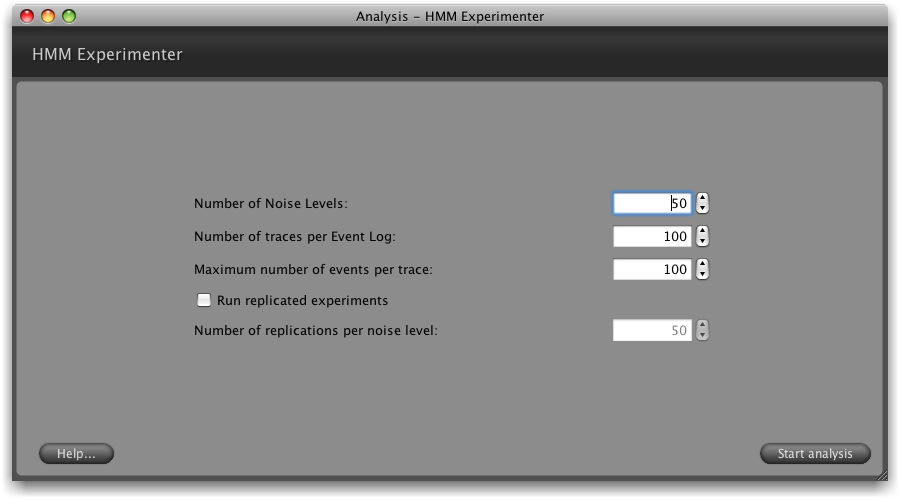
Based on your configuration, the HMM Experimenter will then create logs containing different levels of observation noise and transition noise (refer to [2] for details on the noise generation), for each of the models contained in your InputModels folder.
- NoisyLogs. This folder contains the MXML logs for the different noise levels.
- RefHmms. This folder contains the noisy HMMs that were used to generate these logs (as DOT files).
- Evaluation. This folder contains Gnuplot scripts that visualize the development of the five fitness metrics compared in [1,2] over the different noise levels (from 0%-100% noise), for both the observation and transition noise variant.
To generate the evaluation graphs, you can open either the FitnessEvaluation_lines.gpl or the FitnessEvaluation_points.gpl file in the corresponding evaluation folder, which will automatically create a PS file of the graph in that same folder.
Publications-
Evaluating the Quality of Discovered Process Models
A. Rozinat, M. Veloso, and W.M.P. van der Aalst
In W. Bridewell, T. Calders, A.K. de Medeiros, S. Kramer, M. Pechenizkiy, and L. Todorovski, editors, Proceedings of IPM 2008 induction of process models, Second International Workshop on the Induction of Process Models, at ECML PKDD 2008, 15 September 2008, Antwerp, Belgium, pages 45–52, 2008.
-
Using Hidden Markov Models to Evaluate the Quality of Discovered Process Models
A. Rozinat, M. Veloso, and W.M.P. van der Aalst
Extended Version. BPM Center Report BPM-08-10, BPMcenter.org, 2008.