The semantic organizational miner discovers groups of users
that work together based on task similarity. Tasks are
considered to be similar whenever they are instances of same
concepts. The discovered groups associate task concepts to
originator concepts. Besides, for every concept linked to a
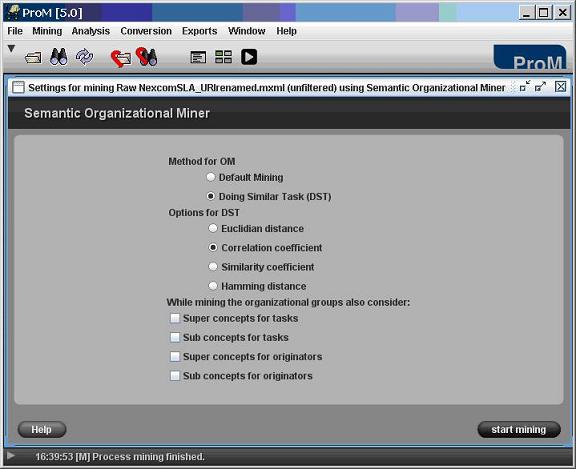
group, all of its instances are shown. Figure 1 shows the main
interface of this plug-in and Figure 2 shows an example of its
result.
How to Use
Open a SA-MXML log file by clicking on the menu option
File→Open Supported File….
Start the Semantic Organizational Mining plug-in via
clicking Mining→ LogName→ Semantic Organizational Miner. You
should get a screen like the one in Figure 1. In this
interface you can select the desired methods and options to
be used during the mining.
Click on the button start mining to run this plug-in. You
should get a screen like the one in Figure 2.
Figure 1. Screenshot of the configuration interface of the
Semantic Organizational Miner plug-in
Figure 2. Screenshot showing the result of applying the
Semantic Organizational Mining to a SA-MXML log